Fields
as in field of vision, field of thought, and field notes


I forked Kevin Roose's open-source read-it-later app and rebuilt it around a different use case: visual research.
The original Stash is a clean, text-first Pocket replacement — save articles, own your data, no subscription. It's genuinely great. But in CRO and UX work, a huge chunk of what's worth saving isn't an article. It's a UI pattern, a campaign page, a product detail page, a screenshot. Text-only tools don't really serve that.
My version is built around a masonry grid that renders different content types differently — articles, images, books, products, highlights, music, video, links, and notes each get their own card treatment. Saved articles open in a full reading pane. Everything is searchable, and you can filter by folder, tag, content type, or colour label.
I also built out the browser extensions a bit. The original had a Chrome extension but nothing for Safari, and I tend to have both open at the same time, so I built a Safari extension too. The extensions save entire URLs by default, which isn't always what I want — a lot of what I'm saving is a specific image or UI component rather than a whole page — so I added a right-click shortcut to save individual media directly.
The AI layer handles the tedious parts: GPT-4o-mini auto-tags saves on ingest, and a separate edge function generates a TLDR for any article — useful for deciding whether something is worth a full read. For image-heavy research, there's semantic image search to surface visually similar saves.
The most involved bit is the canvas — a freeform spatial board for thinking with your library rather than just browsing it. Place saves as cards, add freehand notes, draw connections between them. Built entirely with pointer events and SVG, no third-party graph library.
Still vanilla JS, still self-hosted, still free.
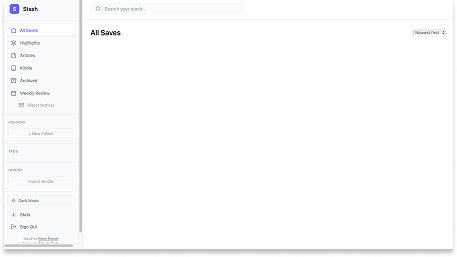
Stash — The OG
The original interface was functional but optimised for text-based media.
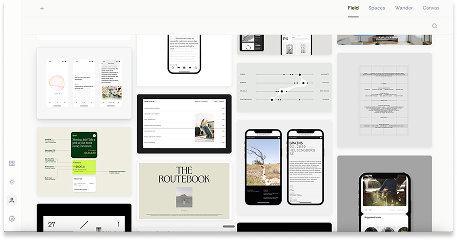
My Version
A visual-first interface that supports the way I think, work and take notes.
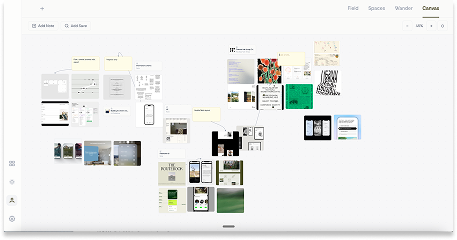
The Canvas
A freeform spatial board for thinking with your library, not just browsing it.